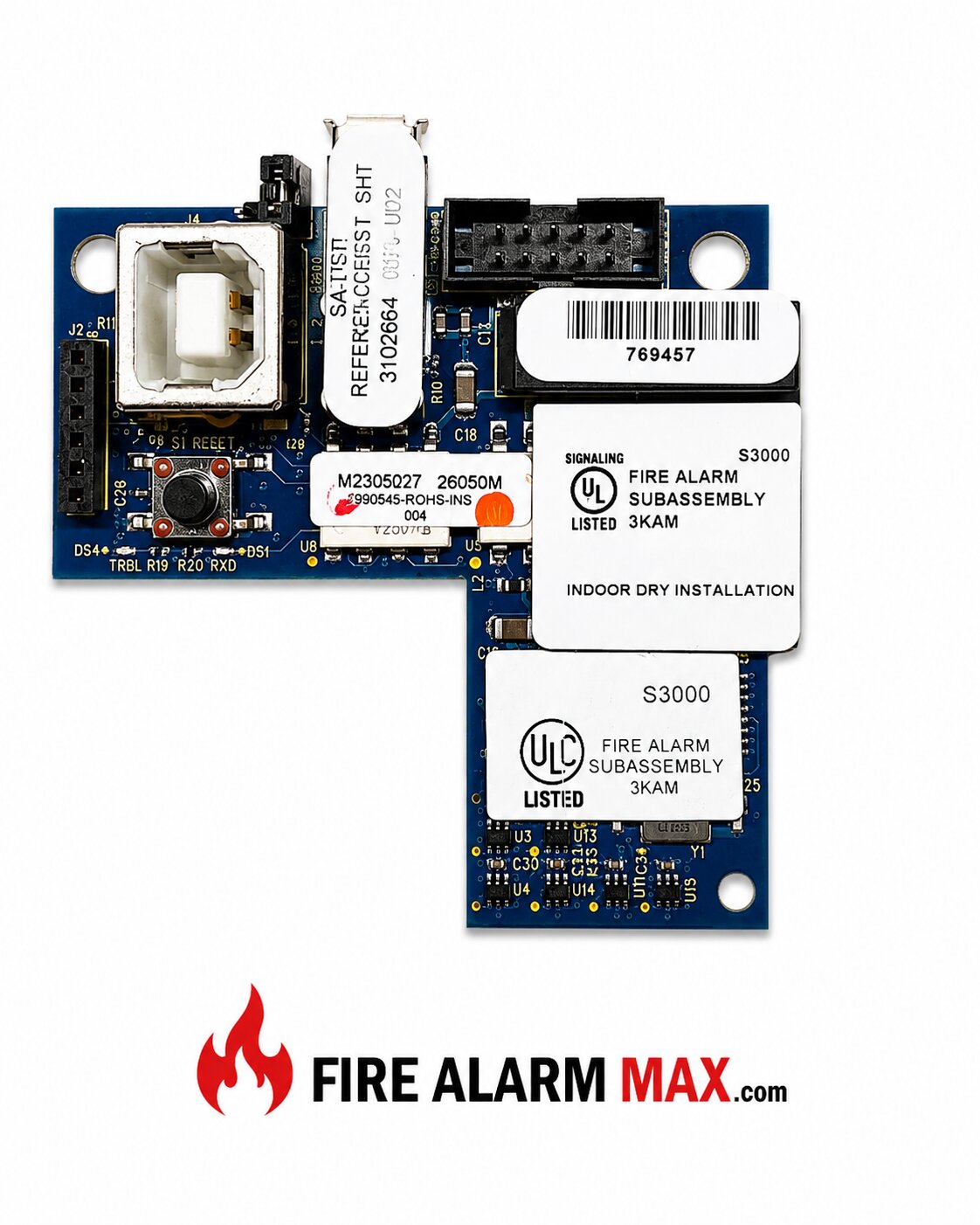
The Edwards SA-USB Interface Card is a commercial communication accessory designed for compatible Edwards iO Series fire alarm control panels. It provides USB connectivity for both a PC and a supported fire alarm printer, allowing installers and service personnel to configure, update, monitor, and document fire alarm system activity.
The interface card features a USB Type-B device port for temporary PC connections and a USB Type-A host port for supported printer connections. It supports Configuration Utility (CU), Firmware Update Utility (FUU), and event printing functions while integrating directly with the fire alarm control panel. This product is intended exclusively for commercial fire alarm installations.
The SA-USB installs directly inside compatible Edwards fire alarm control panels and connects to the panel electronics using the supplied ribbon cable. It provides two dedicated USB interfaces:
Status LEDs indicate transmit, receive, and printer trouble conditions. Printer communication operates at 9600 baud, and the interface supports uploading and downloading panel configuration, firmware updates, and event printing.
The SA-USB mounts inside compatible Edwards fire alarm control panels in the same internal location previously used by the SA-232 interface card. Installation is accomplished using mounting screws and the supplied ribbon cable connected directly to the panel electronics.
The compact printed circuit board design allows convenient access to the USB ports while keeping all communication hardware protected inside the control panel enclosure.
Suitable for:
Compatible with:
Always verify compatibility with the installed Edwards fire alarm control panel, firmware version, software version, printer model, and project requirements before installation.
Manufacturer: Edwards
Model: SA-USB
Product Type: USB Interface Card
Panel Compatibility: Edwards iO Series
PC Connection: USB 2.0 Type-B Device Port
Printer Connection: USB 2.0 Type-A Host Port
Supported Printer: PT-1S Fire Printer
Printer Communication Speed: 9600 Baud
Operating Voltage: 24 VDC
Standby Current: 13 mA
Maximum Current: 20 mA
Configuration Software: Configuration Utility (CU)
Firmware Support: Firmware Update Utility (FUU)
Status Indicators: TX LED, RX LED, Printer Trouble LED
Operating Temperature: 32°F to 120°F (0°C to 49°C)
Operating Humidity: 0%–93% RH Non-Condensing
Installation: Internal Panel Mount
Application: Indoor Commercial Fire Alarm Systems
Listings: Install in accordance with approved Edwards system documentation and applicable local fire alarm codes.
The Edwards SA-USB Interface Card is designed for commercial fire alarm systems requiring USB communication between compatible Edwards iO Series control panels, service computers, and supported fire alarm printers. Typical applications include system programming, firmware updates, event history retrieval, diagnostics, maintenance, and printed event logging in schools, hospitals, office buildings, industrial facilities, government buildings, and other commercial occupancies.
| Weight | 1 lbs |
|---|---|
| Dimensions | 5 × 5 × 5 in |
Your Payment information is processed securely. We do not store credit card details, nor have access to your credit card information.
Orders ship same day
Thousands of parts in stock
Reliable products & service
Order anytime, anywhere
The Edwards SA-USB Interface Card is a commercial communication accessory designed for compatible Edwards iO Series fire alarm control panels. It provides USB connectivity for both a PC and a supported fire alarm printer, allowing installers and service personnel to configure, update, monitor, and document fire alarm system activity.
The interface card features a USB Type-B device port for temporary PC connections and a USB Type-A host port for supported printer connections. It supports Configuration Utility (CU), Firmware Update Utility (FUU), and event printing functions while integrating directly with the fire alarm control panel. This product is intended exclusively for commercial fire alarm installations.
The SA-USB installs directly inside compatible Edwards fire alarm control panels and connects to the panel electronics using the supplied ribbon cable. It provides two dedicated USB interfaces:
Status LEDs indicate transmit, receive, and printer trouble conditions. Printer communication operates at 9600 baud, and the interface supports uploading and downloading panel configuration, firmware updates, and event printing.
The SA-USB mounts inside compatible Edwards fire alarm control panels in the same internal location previously used by the SA-232 interface card. Installation is accomplished using mounting screws and the supplied ribbon cable connected directly to the panel electronics.
The compact printed circuit board design allows convenient access to the USB ports while keeping all communication hardware protected inside the control panel enclosure.
Suitable for:
Compatible with:
Always verify compatibility with the installed Edwards fire alarm control panel, firmware version, software version, printer model, and project requirements before installation.
Manufacturer: Edwards
Model: SA-USB
Product Type: USB Interface Card
Panel Compatibility: Edwards iO Series
PC Connection: USB 2.0 Type-B Device Port
Printer Connection: USB 2.0 Type-A Host Port
Supported Printer: PT-1S Fire Printer
Printer Communication Speed: 9600 Baud
Operating Voltage: 24 VDC
Standby Current: 13 mA
Maximum Current: 20 mA
Configuration Software: Configuration Utility (CU)
Firmware Support: Firmware Update Utility (FUU)
Status Indicators: TX LED, RX LED, Printer Trouble LED
Operating Temperature: 32°F to 120°F (0°C to 49°C)
Operating Humidity: 0%–93% RH Non-Condensing
Installation: Internal Panel Mount
Application: Indoor Commercial Fire Alarm Systems
Listings: Install in accordance with approved Edwards system documentation and applicable local fire alarm codes.
The Edwards SA-USB Interface Card is designed for commercial fire alarm systems requiring USB communication between compatible Edwards iO Series control panels, service computers, and supported fire alarm printers. Typical applications include system programming, firmware updates, event history retrieval, diagnostics, maintenance, and printed event logging in schools, hospitals, office buildings, industrial facilities, government buildings, and other commercial occupancies.
| Weight | 1 lbs |
|---|---|
| Dimensions | 5 × 5 × 5 in |
Your Payment information is processed securely. We do not store credit card details, nor have access to your credit card information.



Select at least 2 products
to compare